Custom Words are used to manage the variations in terms of names of batches, sections or courses, etc. in the Institution inside the Fedena.
Admin or the privileged user can add the custom words which helps to display the required words in the Fedena UI.
In order to create or add the custom words, Admin or the privileged user need to follow the below steps:
At the top of your dashboard, click the Menu
 > Administration > Settings > Custom Words to open the Custom words configuration page.

Click on the radio button to enable and enter the custom words.
Enter the custom words for a different entity which are:
Course: Course can be called as Class/Course in the institute.
Batch: Batch can be called as Section/Semester in the institute.
Subject: Subject can be called Paper/Modules etc.
Elective :A subject that students can choose based on their interests or the institution's academic requirements..
Floating :A subject that can be shared across multiple batches or courses, allowing it to be assigned without creating a separate subject for each batch. It is useful when students from different batches take the same subject.
Pincode :location code
The user needs to enter the Lower Case and Lower Case Plural for creating the custom words.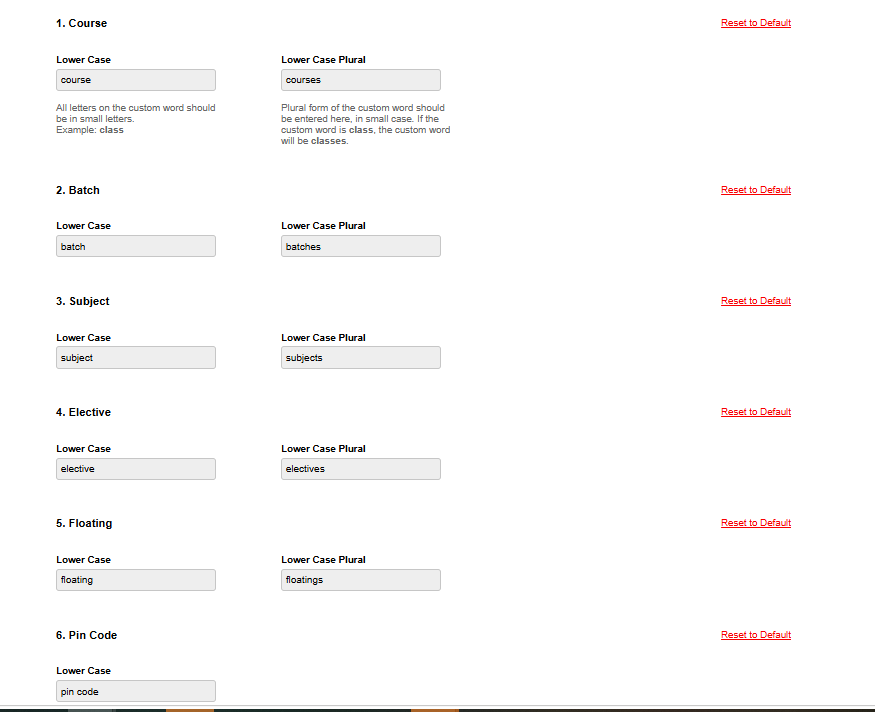
Click on the Save changes button to save the configuration.
Was this article helpful?
That’s Great!
Thank you for your feedback
Sorry! We couldn't be helpful
Thank you for your feedback
Feedback sent
We appreciate your effort and will try to fix the article