Yes. Schools can use their own email settings (SMTP configuration) instead of inheriting the email settings configured at the company or Partner level.
Fedena provides 2 options:
Inherit Email Settings: The school uses the SMTP settings configured by the Partner/Company.
Own Email Settings: The school uses its own SMTP settings to send emails from its institutional email account.
This allows each school to manage its email communication independently.
Note: The email account configured in Fedena must have Two-Factor Authentication (2FA) enabled. If the email provider requires an app password for SMTP authentication, generate an app password from the email account and use it in the SMTP configuration instead of the regular email password.
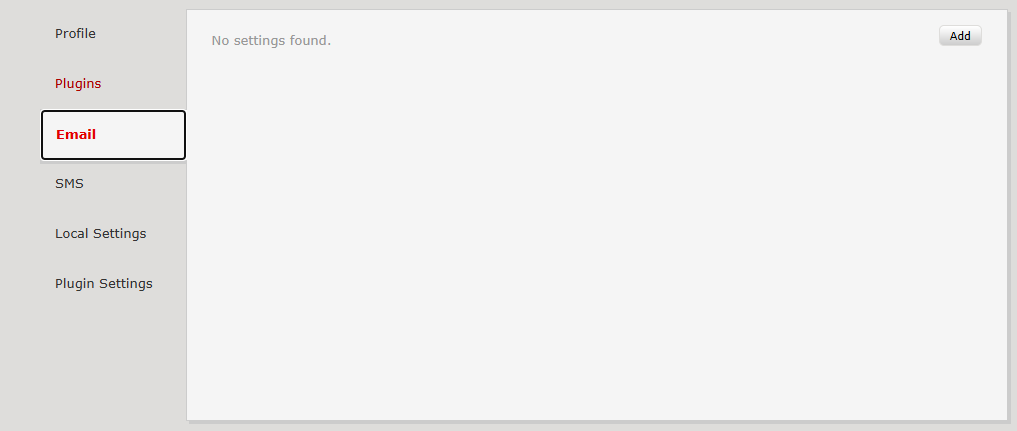
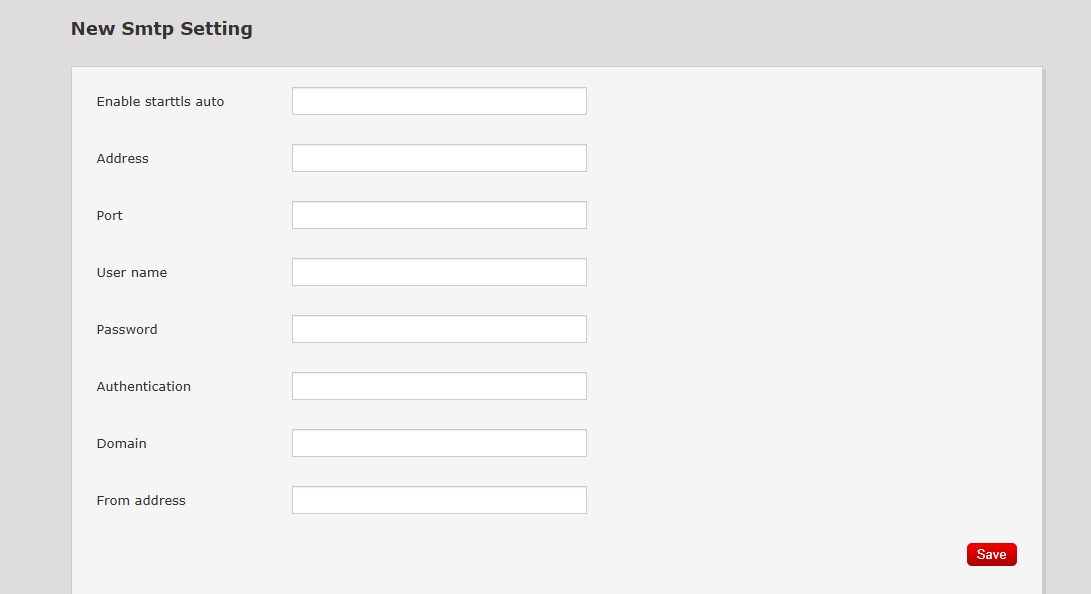
Enter the SMTP information provided by the school's email service provider in Accounts Panel Dashboard.
As per the screen shots shared
Field | Description |
|---|---|
Enable STARTTLS Auto | Set according to the email provider's requirements |
Address | SMTP server address |
Port | SMTP port number |
Username | Email account username ( Email Id ) |
Password | app password from the email account |
Authentication | Authentication method supported by the provider |
Domain | Domain name, if required |
From Address | Email address displayed as the sender |
Was this article helpful?
That’s Great!
Thank you for your feedback
Sorry! We couldn't be helpful
Thank you for your feedback
Feedback sent
We appreciate your effort and will try to fix the article